Get Started with Narrat and create a game in a minute
Getting started with narrat is very quick. There is a ready-to-use template that can get you running your game in a minute
In this page
What Narrat is for
Narrat specialises in helping you create narrative games with no programming. If you want to make action games, or games with many custom-made features, you may want a more typical general-purpose game engine. You can read more about Narrat's features, philosophy, limitations and how to add new features in this page.
Interactive Demo
If you want to quickly get an idea of how narrat works without creating a project, the interactive playground demo lets you edit the narrat demo game instantly in your browser.
Video Guide
For text instructions, jump to the next section.
If you prefer to follow a video, this one minute video shows the entire setup from start to having the game running.
Text Instructions
Prerequisites
- Be on a computer running Windows, MacOS or Linux
- Being able to use the terminal and powershell on your computer (some computers block it by default, so if your terminal complains about not being allowed to run script, look at this solution)
- Have node.js 22.17.1+ installed (use the latest v22.x, more recent ones might have issues). Strongly recommended to use nvm (linux/mac) or nvm for windows to install and manage your node.js version easily for future updates. Prefer installing LTS versions which are more stable.
- Once node.js is installed, install pnpm 10.x (not 11, which has issues):
corepack enable pnpmcorepack use pnpm@latest-10
- A text editor, we recommend VS Code with the narrat language extension.
::: warn Recent security updates to pnpm (in versions 11+) have broken some things in narrat due to strictly blocking some scripts from automatically running. If you see errors like [ERR_PNPM_EXOTIC_SUBDEP] Exotic dependency, downgrade back to pnpm 10 using something like npm install -g pnpm@10.13.1.
More recent node.js versions may also break things, narrat is currently known to work with node.js 22.x, and pnpm 10.x
:::
TIP
You should use version control when working on a game project. Version control allows you to:
- Not lose your work as you have a backup
- Create frequent checkpoints you can revert to and compare with recent changes if you break your game
- Work with others on the same project (if you desire to)
Ideally use something like git, or at worse something like Dropbox. It is up to you.
Creating the game project
Open a terminal in a folder of your choice (on Windows, you can shift-right-click in your folder and choose "Open PowerShell window here")
Help with opening the terminal
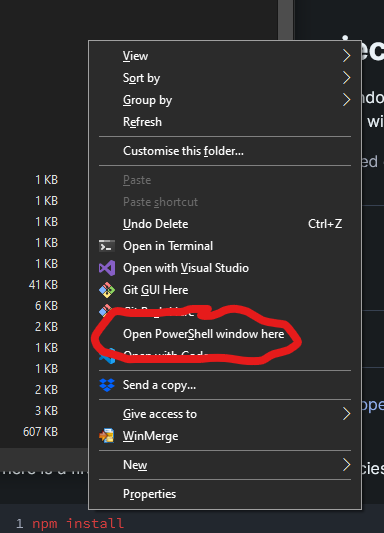
For more info on how to open a terminal in a folder on Windows and other OS, see this link
Once opened, you can run the following command:
pnpm create narrat@latestThis will download narrat and ask you some questions to configure your project. You can choose between a few game templates to get started. You can now follow the instructions from the tool to run the game, or follow the "Running the game" guide below
How it works
The narrat template is essentially a template for a mostly empty web project, with narrat as a library.
node.js is the JavaScript engine used to run our project (and build it or export it to an executable game later).
We use pnpmto install libraries into the game. pnpm is simply a package manager for installing JS libraries with node.js
There is a package.json file at the root of the template, which is a standard node.js file for defining a project and its dependencies, which get installed via npm. Inside the dependencies part of this file, you can find narrat with a version number. This is what tells the project to install a specific version of narrat.
Our template uses pnpm to download and install narrat (and other dependencies) and get the game ready to go. Then using pnpm scripts, we can use run commands to build/export the game (which all use node.js under the hood one way or another).
Why can I not just download an html file of narrat and modify it?
The reason narrat comes as a web application template with commands to build and run it is that it allows the build system to do a lot of magic to compile narrat files, to allow hot-reloading of your scripts and configs, and to make it easy to build for different platforms, enable/disable debugging, etc.
Install libraries (only the first time or when updating)
With the narrat game setup, open a terminal inside the folder
There is a first command to install the dependencies (libraries) on first use:
pnpm installIf you get warnings durin pnpm install
Unless you see actual errors, warnings can generally be ignored
Security issues warning
You will probably se pnpm complain about "security issues". Those are false positives and can be ignored caused by a very careless implementation of security by NPM. Those security issues are irrelevant to the use case of narrat. Feel free to read more about wh pnpm security warnings are broken in this article by Dan Abramov, creator of React
Running the game
pnpm startThis should open a browser tab with the game running after a short build time. The game can be accessed at localhost:5173
The game is ready to edit!
INFO
Those pnpm commands come from having node.js and pnpm installed. If the commands aren't recognised, you probably didn't install node.js correctly. More abou pnpm install
Overview of Narrat
Now that the game is running, you might want to look at the Overview of Narrat to understand what the different parts of a Narrat game are and how to use them.
Editing the game
It is now easy to make a game by editing the narrat scripts and config files!